[ DEVELOPERS ]
Frequently Asked Questions
From hardware setup to SDK configuration, find answers to the questions that matter most when building with NODAR.
Getting Started
How is NODAR different?
NODAR’s Hammerhead technology enables unparalleled detection of small objects at large distances by supporting large-baseline mounts (0.5-5m or larger) with independently mounted (no connecting bar), high-resolution cameras. This is accomplished with patented algorithms that automatically calibrate in real-time to compensate for misalignments that arise from larger baselines.
What type of support is available?
The HDK includes access to a support portal and a dedicated support email address. We aim to reply to critical issues within 24 hours. The SDK includes 12 months of software updates and full developer documentation. For premium support options, contact support@nodarsensor.com.
How Does NODAR's Stereo Vision Compare to LiDAR?
NODAR's ultra-wide baseline stereo vision outperforms LiDAR across five dimensions critical to autonomous system deployment: range, point cloud density, weather resilience, hardware longevity, and supply chain reliability.
Range: NODAR's Hammerhead software achieves effective 3D sensing at ranges exceeding 1,000 meters. Most commercial LiDAR systems operate at 50–200 meters.
Point cloud density: Hammerhead generates approximately 50 million 3D points per second — equivalent to ten 128-channel LiDAR units operating simultaneously. Typical LiDAR systems produce 0.3–5 million points per second.
Weather resilience: Stereo vision uses passive ambient light and degrades gradually in rain, fog, and dust. LiDAR emits active laser pulses that backscatter off precipitation particles, causing rapid signal degradation in even light rain or fog.
Hardware longevity: NODAR's software runs on standard off-the-shelf cameras with no moving parts, supporting operational lifetimes exceeding 30 years. Mechanical LiDAR systems typically require replacement within 1–3 years due to rotating components.
Supply chain: Because Hammerhead is compatible with any standard camera, customers have multiple redundant hardware suppliers. LiDAR procurement relies on a small number of specialized manufacturers with known production constraints.
Can I input stereo data we’ve collected using other hardware?
Yes, if you have previously collected images from two synchronized cameras with intrinsic and extrinsic parameters, the NODAR SDK can read these images and provide real-time depth estimates. Alternatively, these images can be processed in the cloud with NODAR cloud. For premium support, contact support@nodarsensor.com.
How does calibration work?
Stereo cameras are known to lose alignment due to vehicle vibration, temperature fluctuations, and long-term, small component movements. Using unique patented technology, Hammerhead automatically calibrates on every video frame to compensate for these alignment variations.
How is NODAR different?
NODAR’s Hammerhead technology enables unparalleled detection of small objects at large distances by supporting large-baseline mounts (0.5-5m or larger) with independently mounted (no connecting bar), high-resolution cameras. This is accomplished with patented algorithms that automatically calibrate in real-time to compensate for misalignments that arise from larger baselines.
What type of support is available?
The HDK includes access to a support portal and a dedicated support email address. We aim to reply to critical issues within 24 hours. The SDK includes 12 months of software updates and full developer documentation. For premium support options, contact support@nodarsensor.com.
How Does NODAR's Stereo Vision Compare to LiDAR?
NODAR's ultra-wide baseline stereo vision outperforms LiDAR across five dimensions critical to autonomous system deployment: range, point cloud density, weather resilience, hardware longevity, and supply chain reliability.
Range: NODAR's Hammerhead software achieves effective 3D sensing at ranges exceeding 1,000 meters. Most commercial LiDAR systems operate at 50–200 meters.
Point cloud density: Hammerhead generates approximately 50 million 3D points per second — equivalent to ten 128-channel LiDAR units operating simultaneously. Typical LiDAR systems produce 0.3–5 million points per second.
Weather resilience: Stereo vision uses passive ambient light and degrades gradually in rain, fog, and dust. LiDAR emits active laser pulses that backscatter off precipitation particles, causing rapid signal degradation in even light rain or fog.
Hardware longevity: NODAR's software runs on standard off-the-shelf cameras with no moving parts, supporting operational lifetimes exceeding 30 years. Mechanical LiDAR systems typically require replacement within 1–3 years due to rotating components.
Supply chain: Because Hammerhead is compatible with any standard camera, customers have multiple redundant hardware suppliers. LiDAR procurement relies on a small number of specialized manufacturers with known production constraints.
Can I input stereo data we’ve collected using other hardware?
Yes, if you have previously collected images from two synchronized cameras with intrinsic and extrinsic parameters, the NODAR SDK can read these images and provide real-time depth estimates. Alternatively, these images can be processed in the cloud with NODAR cloud. For premium support, contact support@nodarsensor.com.
How does calibration work?
Stereo cameras are known to lose alignment due to vehicle vibration, temperature fluctuations, and long-term, small component movements. Using unique patented technology, Hammerhead automatically calibrates on every video frame to compensate for these alignment variations.
How is NODAR different?
NODAR’s Hammerhead technology enables unparalleled detection of small objects at large distances by supporting large-baseline mounts (0.5-5m or larger) with independently mounted (no connecting bar), high-resolution cameras. This is accomplished with patented algorithms that automatically calibrate in real-time to compensate for misalignments that arise from larger baselines.
What type of support is available?
The HDK includes access to a support portal and a dedicated support email address. We aim to reply to critical issues within 24 hours. The SDK includes 12 months of software updates and full developer documentation. For premium support options, contact support@nodarsensor.com.
How Does NODAR's Stereo Vision Compare to LiDAR?
NODAR's ultra-wide baseline stereo vision outperforms LiDAR across five dimensions critical to autonomous system deployment: range, point cloud density, weather resilience, hardware longevity, and supply chain reliability.
Range: NODAR's Hammerhead software achieves effective 3D sensing at ranges exceeding 1,000 meters. Most commercial LiDAR systems operate at 50–200 meters.
Point cloud density: Hammerhead generates approximately 50 million 3D points per second — equivalent to ten 128-channel LiDAR units operating simultaneously. Typical LiDAR systems produce 0.3–5 million points per second.
Weather resilience: Stereo vision uses passive ambient light and degrades gradually in rain, fog, and dust. LiDAR emits active laser pulses that backscatter off precipitation particles, causing rapid signal degradation in even light rain or fog.
Hardware longevity: NODAR's software runs on standard off-the-shelf cameras with no moving parts, supporting operational lifetimes exceeding 30 years. Mechanical LiDAR systems typically require replacement within 1–3 years due to rotating components.
Supply chain: Because Hammerhead is compatible with any standard camera, customers have multiple redundant hardware suppliers. LiDAR procurement relies on a small number of specialized manufacturers with known production constraints.
Can I input stereo data we’ve collected using other hardware?
Yes, if you have previously collected images from two synchronized cameras with intrinsic and extrinsic parameters, the NODAR SDK can read these images and provide real-time depth estimates. Alternatively, these images can be processed in the cloud with NODAR cloud. For premium support, contact support@nodarsensor.com.
How does calibration work?
Stereo cameras are known to lose alignment due to vehicle vibration, temperature fluctuations, and long-term, small component movements. Using unique patented technology, Hammerhead automatically calibrates on every video frame to compensate for these alignment variations.
NODAR HDK
What is included in Hammerhead’s HDK 2.0?
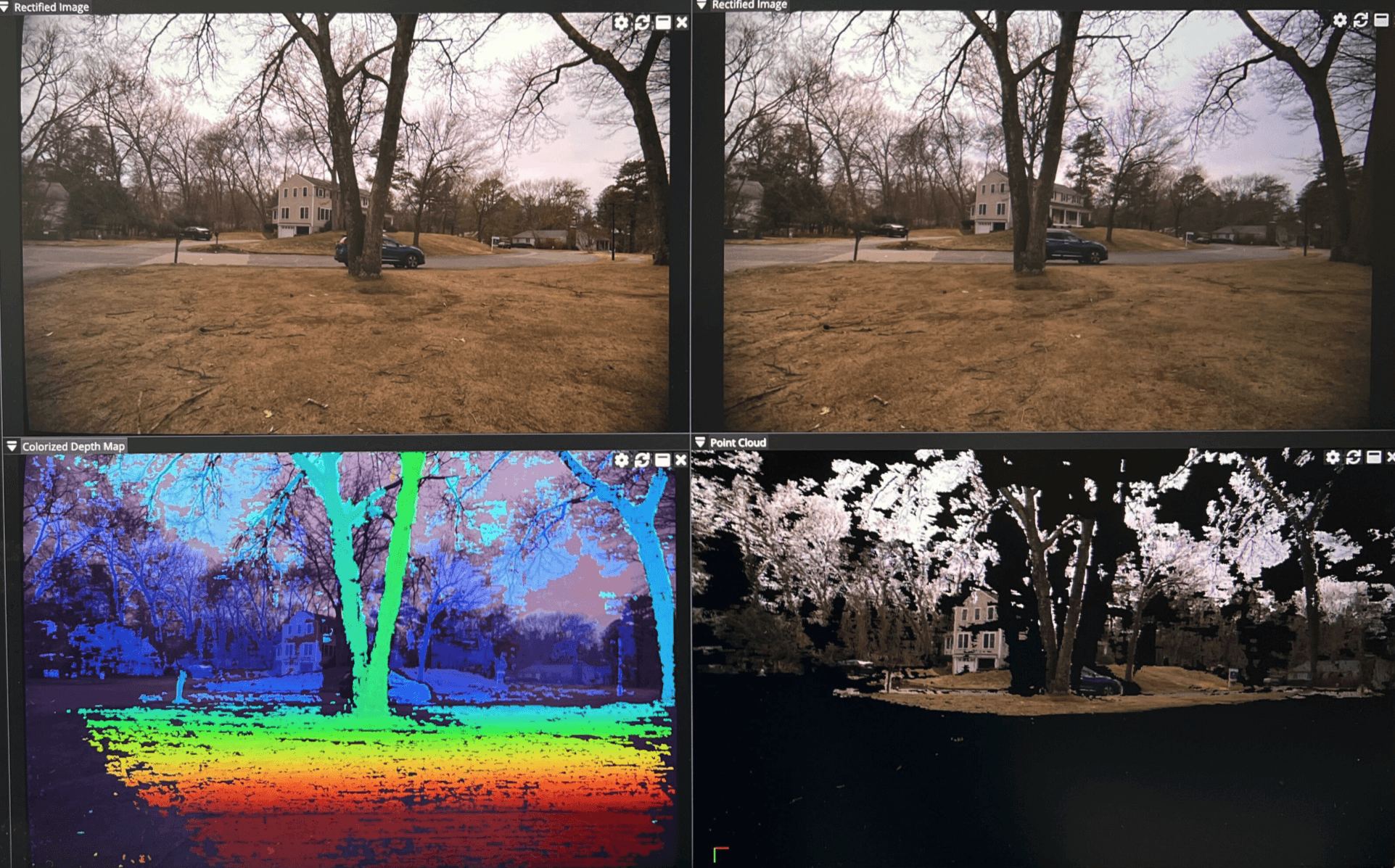
The HDK includes both hardware and software to evaluate and integrate with Hammerhead. The hardware is comprised of an Electronic Control Unit (ECU), 2 cameras, and all necessary connection cables. The software includes applications for demoing Hammerhead, collecting data, calibrating the initial camera setup, and an integration API.
How long does the HDK installation take?
The HDK is designed to work immediately out of the box. You would only need to connect a power source and a display to see Hammerhead technology in action.
Check out our unboxing video.
What mounting configurations are supported for HDK 2.0?
The entire HDK camera assembly can be mounted to a vehicle or structure via tripod mounting holes (¼-20” threaded holes, 5 on the bottom and 2 on the back. See drawing here.)
Even though the cameras in the HDK are mounted at a fixed baseline, production versions of Hammerhead can be shipped with custom baselines and mounts depending on specific application requirements.
What is the HDK's camera resolution?
As shipped with the HDK, a 5-megapixel resolution is supported. If desired, additional resolutions can also be supported with different camera hardware.
How is software integration done for HDK 2.0?
The HDK ships with ROS2 and C++ APIs, along with thorough documentation at https://github.com/nodarhub. Other integration options can be provided as a custom effort.
The sdk is described at docs.nodarsensor.net.
Why was a 5.4 MP camera selected for the HDK, instead of higher-resolution alternatives (e.g., 4096 × 1200)?
The camera was selected for automotive grade and for HDR. Higher-resolution cameras are usually not HDR, which is a key requirement for outdoor autonomy use cases. The SDK supports resolutions of 8 MP and higher; typically limited by GPU memory.
Which computing platforms are supported by HDK 2.0?
The HDK includes an NVIDIA Orin processing unit. Hammerhead can also be ported to other processors as a custom project.
Why was a rolling-shutter sensor selected instead of a global-shutter sensor for stereo vision?
Most commercially available cameras offering very high dynamic range (typically 120–140 dB HDR) use rolling-shutter sensors. High dynamic range is critical for outdoor operation, including performance in shadows, direct sun, dusk, dawn, and other challenging lighting conditions. The SDK supports both rolling-shutter and global-shutter cameras, allowing integrators to select the sensor type that best matches their system requirements.
Is motion blur typically observed with the 5.4 MP rolling-shutter cameras under Hammerhead’s expected operating conditions?
Motion blur is generally not a problem for Hammerhead stereo matching, as blur is typically similar in both cameras and therefore remains matchable.
Blur is most commonly observed when cameras are mounted close to the ground at higher vehicle speeds, or during low-light operation when longer exposure times are required. In these cases, reducing exposure while increasing camera gain, can mitigate blur.
The rolling shutter effect is distinct from motion blur and is a distortion that occurs in cameras, causing warping and skewing of fast-moving objects, such as bent propellers and slanted buildings. For autonomous systems, this effect is typically negligible because the rolling shutter distortion of mechanically scanning LiDAR is orders of magnitude larger.
What is included in Hammerhead’s HDK 2.0?
The HDK includes both hardware and software to evaluate and integrate with Hammerhead. The hardware is comprised of an Electronic Control Unit (ECU), 2 cameras, and all necessary connection cables. The software includes applications for demoing Hammerhead, collecting data, calibrating the initial camera setup, and an integration API.
How long does the HDK installation take?
The HDK is designed to work immediately out of the box. You would only need to connect a power source and a display to see Hammerhead technology in action.
Check out our unboxing video.
What mounting configurations are supported for HDK 2.0?
The entire HDK camera assembly can be mounted to a vehicle or structure via tripod mounting holes (¼-20” threaded holes, 5 on the bottom and 2 on the back. See drawing here.)
Even though the cameras in the HDK are mounted at a fixed baseline, production versions of Hammerhead can be shipped with custom baselines and mounts depending on specific application requirements.
What is the HDK's camera resolution?
As shipped with the HDK, a 5-megapixel resolution is supported. If desired, additional resolutions can also be supported with different camera hardware.
How is software integration done for HDK 2.0?
The HDK ships with ROS2 and C++ APIs, along with thorough documentation at https://github.com/nodarhub. Other integration options can be provided as a custom effort.
The sdk is described at docs.nodarsensor.net.
Why was a 5.4 MP camera selected for the HDK, instead of higher-resolution alternatives (e.g., 4096 × 1200)?
The camera was selected for automotive grade and for HDR. Higher-resolution cameras are usually not HDR, which is a key requirement for outdoor autonomy use cases. The SDK supports resolutions of 8 MP and higher; typically limited by GPU memory.
Which computing platforms are supported by HDK 2.0?
The HDK includes an NVIDIA Orin processing unit. Hammerhead can also be ported to other processors as a custom project.
Why was a rolling-shutter sensor selected instead of a global-shutter sensor for stereo vision?
Most commercially available cameras offering very high dynamic range (typically 120–140 dB HDR) use rolling-shutter sensors. High dynamic range is critical for outdoor operation, including performance in shadows, direct sun, dusk, dawn, and other challenging lighting conditions. The SDK supports both rolling-shutter and global-shutter cameras, allowing integrators to select the sensor type that best matches their system requirements.
Is motion blur typically observed with the 5.4 MP rolling-shutter cameras under Hammerhead’s expected operating conditions?
Motion blur is generally not a problem for Hammerhead stereo matching, as blur is typically similar in both cameras and therefore remains matchable.
Blur is most commonly observed when cameras are mounted close to the ground at higher vehicle speeds, or during low-light operation when longer exposure times are required. In these cases, reducing exposure while increasing camera gain, can mitigate blur.
The rolling shutter effect is distinct from motion blur and is a distortion that occurs in cameras, causing warping and skewing of fast-moving objects, such as bent propellers and slanted buildings. For autonomous systems, this effect is typically negligible because the rolling shutter distortion of mechanically scanning LiDAR is orders of magnitude larger.
What is included in Hammerhead’s HDK 2.0?
The HDK includes both hardware and software to evaluate and integrate with Hammerhead. The hardware is comprised of an Electronic Control Unit (ECU), 2 cameras, and all necessary connection cables. The software includes applications for demoing Hammerhead, collecting data, calibrating the initial camera setup, and an integration API.
How long does the HDK installation take?
The HDK is designed to work immediately out of the box. You would only need to connect a power source and a display to see Hammerhead technology in action.
Check out our unboxing video.
What mounting configurations are supported for HDK 2.0?
The entire HDK camera assembly can be mounted to a vehicle or structure via tripod mounting holes (¼-20” threaded holes, 5 on the bottom and 2 on the back. See drawing here.)
Even though the cameras in the HDK are mounted at a fixed baseline, production versions of Hammerhead can be shipped with custom baselines and mounts depending on specific application requirements.
What is the HDK's camera resolution?
As shipped with the HDK, a 5-megapixel resolution is supported. If desired, additional resolutions can also be supported with different camera hardware.
How is software integration done for HDK 2.0?
The HDK ships with ROS2 and C++ APIs, along with thorough documentation at https://github.com/nodarhub. Other integration options can be provided as a custom effort.
The sdk is described at docs.nodarsensor.net.
Why was a 5.4 MP camera selected for the HDK, instead of higher-resolution alternatives (e.g., 4096 × 1200)?
The camera was selected for automotive grade and for HDR. Higher-resolution cameras are usually not HDR, which is a key requirement for outdoor autonomy use cases. The SDK supports resolutions of 8 MP and higher; typically limited by GPU memory.
Which computing platforms are supported by HDK 2.0?
The HDK includes an NVIDIA Orin processing unit. Hammerhead can also be ported to other processors as a custom project.
Why was a rolling-shutter sensor selected instead of a global-shutter sensor for stereo vision?
Most commercially available cameras offering very high dynamic range (typically 120–140 dB HDR) use rolling-shutter sensors. High dynamic range is critical for outdoor operation, including performance in shadows, direct sun, dusk, dawn, and other challenging lighting conditions. The SDK supports both rolling-shutter and global-shutter cameras, allowing integrators to select the sensor type that best matches their system requirements.
Is motion blur typically observed with the 5.4 MP rolling-shutter cameras under Hammerhead’s expected operating conditions?
Motion blur is generally not a problem for Hammerhead stereo matching, as blur is typically similar in both cameras and therefore remains matchable.
Blur is most commonly observed when cameras are mounted close to the ground at higher vehicle speeds, or during low-light operation when longer exposure times are required. In these cases, reducing exposure while increasing camera gain, can mitigate blur.
The rolling shutter effect is distinct from motion blur and is a distortion that occurs in cameras, causing warping and skewing of fast-moving objects, such as bent propellers and slanted buildings. For autonomous systems, this effect is typically negligible because the rolling shutter distortion of mechanically scanning LiDAR is orders of magnitude larger.
NODAR SDK
What is included in NODAR’s SDK?
The SDK includes all the software needed to evaluate and integrate with Hammerhead. The software includes applications for demoing Hammerhead, collecting data, calibrating the initial camera setup, and C++ and Python APIs. The NODAR Viewer is provided for depth and point-cloud visualization. Our GridDetect occupancy map software is available as an add-on option.
Why should I include GridDetect with the SDK?
GridDetect is a high-performance, GPU-accelerated implementation of a deterministic particle filter algorithm for occupancy grid creation. It converts dense 3D point-cloud data into a robust, real-time understanding of free space and obstacles.
In practical terms, GridDetect adds three key capabilities to the SDK:
High-throughput performance
Processes up to 100 million 3D points per second, enabling real-time operation with dense, long-range stereo data.Robust ground removal
Effectively separates ground from obstacles, supporting detection of objects as small as a 15 cm brick at 150 m on a highway, as well as subtle features like emerging crops on uneven agricultural terrain.Terrain-aware reasoning
Correctly handles slopes, hills, and ramps without misclassifying them as obstacles.
Together, these capabilities allow developers to move beyond raw depth data and achieve stable, long-range obstacle detection suitable for automotive, agricultural, and industrial autonomy applications.
What cameras models are supported by the SDK?
The NODAR SDK is camera-agnostic. We have tested rolling shutter and global shutter RGB cameras, LWIR cameras, and resolutions from 1MP to 8MP.
While any camera is compatible, optimal performance is achieved with synchronized cameras that have overlapping fields of view and provide uncompressed images. The system supports native resolutions up to 8MP, but this is subject to available GPU memory; higher resolutions will require downsampling.
What computing platforms are supported by the SDK?
The SDK is provided as prebuilt .deb packages for the following configurations:
Ubuntu 20.04
CUDA 11.4 (AMD64, ARM64)
CUDA 12.0 (AMD64)
Ubuntu 22.04
CUDA 12.1, 12.2, 12.3, 12.6, 13.0 (AMD64)
CUDA 12.2, 12.6 (ARM64)Ubuntu 24.04
CUDA 12.9, 13.0 (AMD64)
Typical performance (5.4 MP images)
Jetson Orin AGX: ~5–10 fps
NVIDIA RTX A5500 (Laptop): ~15–20 fps
NVIDIA GeForce RTX 4090 (Desktop): ~20–25 fps
Performance varies based on configuration, including image resolution (1–8 MP), bit depth (8-bit vs. 16-bit), and whether optional modules such as GridDetect are enabled.
As a general guideline:
Modern laptops typically achieve ~15–20 fps
Desktop systems with high-end GPUs typically achieve ~20–30 fps
What are the minimum recommended compute specs for the SDK?
We currently require an NVIDIA GPU. Our binaries rely on Cuda and target Ubuntu 20.04, 22.04, and 24.04 for ARM and AMD64 (Intel and AMD Cpus). Check here for a complete list of supported systems.
Should I use ZMQ or ROS 2 for integration?
For new integrations, we recommend ZMQ. It's simpler to set up, performs better for high-throughput data like point clouds, and doesn't introduce toolchain dependencies. We support ROS 2 because many teams request it, but it comes with real tradeoffs: it ties your dependency versions to the ROS ecosystem, throughput through its middleware layer may not meet production requirements, and ROS 2 releases are tightly coupled to specific Ubuntu versions — which can be a significant constraint on NVIDIA Jetson hardware where JetPack often lags the current Ubuntu release by several years.
If your team is already deeply invested in ROS 2, it can work — but if you're building a new system from scratch, ZMQ will give you more flexibility and fewer surprises down the road.
Does the SDK output classify specific objects, like a car, or the occupied grid coordinates and depth?
The SDK provides occupied grid coordinates and depth. If you want classes of objects (car, motorcycle, etc), our customers have had success with applying YOLO to the rectified images to obtain classes of objects.
What is included in NODAR’s SDK?
The SDK includes all the software needed to evaluate and integrate with Hammerhead. The software includes applications for demoing Hammerhead, collecting data, calibrating the initial camera setup, and C++ and Python APIs. The NODAR Viewer is provided for depth and point-cloud visualization. Our GridDetect occupancy map software is available as an add-on option.
Why should I include GridDetect with the SDK?
GridDetect is a high-performance, GPU-accelerated implementation of a deterministic particle filter algorithm for occupancy grid creation. It converts dense 3D point-cloud data into a robust, real-time understanding of free space and obstacles.
In practical terms, GridDetect adds three key capabilities to the SDK:
High-throughput performance
Processes up to 100 million 3D points per second, enabling real-time operation with dense, long-range stereo data.Robust ground removal
Effectively separates ground from obstacles, supporting detection of objects as small as a 15 cm brick at 150 m on a highway, as well as subtle features like emerging crops on uneven agricultural terrain.Terrain-aware reasoning
Correctly handles slopes, hills, and ramps without misclassifying them as obstacles.
Together, these capabilities allow developers to move beyond raw depth data and achieve stable, long-range obstacle detection suitable for automotive, agricultural, and industrial autonomy applications.
What cameras models are supported by the SDK?
The NODAR SDK is camera-agnostic. We have tested rolling shutter and global shutter RGB cameras, LWIR cameras, and resolutions from 1MP to 8MP.
While any camera is compatible, optimal performance is achieved with synchronized cameras that have overlapping fields of view and provide uncompressed images. The system supports native resolutions up to 8MP, but this is subject to available GPU memory; higher resolutions will require downsampling.
What computing platforms are supported by the SDK?
The SDK is provided as prebuilt .deb packages for the following configurations:
Ubuntu 20.04
CUDA 11.4 (AMD64, ARM64)
CUDA 12.0 (AMD64)
Ubuntu 22.04
CUDA 12.1, 12.2, 12.3, 12.6, 13.0 (AMD64)
CUDA 12.2, 12.6 (ARM64)Ubuntu 24.04
CUDA 12.9, 13.0 (AMD64)
Typical performance (5.4 MP images)
Jetson Orin AGX: ~5–10 fps
NVIDIA RTX A5500 (Laptop): ~15–20 fps
NVIDIA GeForce RTX 4090 (Desktop): ~20–25 fps
Performance varies based on configuration, including image resolution (1–8 MP), bit depth (8-bit vs. 16-bit), and whether optional modules such as GridDetect are enabled.
As a general guideline:
Modern laptops typically achieve ~15–20 fps
Desktop systems with high-end GPUs typically achieve ~20–30 fps
What are the minimum recommended compute specs for the SDK?
We currently require an NVIDIA GPU. Our binaries rely on Cuda and target Ubuntu 20.04, 22.04, and 24.04 for ARM and AMD64 (Intel and AMD Cpus). Check here for a complete list of supported systems.
Should I use ZMQ or ROS 2 for integration?
For new integrations, we recommend ZMQ. It's simpler to set up, performs better for high-throughput data like point clouds, and doesn't introduce toolchain dependencies. We support ROS 2 because many teams request it, but it comes with real tradeoffs: it ties your dependency versions to the ROS ecosystem, throughput through its middleware layer may not meet production requirements, and ROS 2 releases are tightly coupled to specific Ubuntu versions — which can be a significant constraint on NVIDIA Jetson hardware where JetPack often lags the current Ubuntu release by several years.
If your team is already deeply invested in ROS 2, it can work — but if you're building a new system from scratch, ZMQ will give you more flexibility and fewer surprises down the road.
Does the SDK output classify specific objects, like a car, or the occupied grid coordinates and depth?
The SDK provides occupied grid coordinates and depth. If you want classes of objects (car, motorcycle, etc), our customers have had success with applying YOLO to the rectified images to obtain classes of objects.
What is included in NODAR’s SDK?
The SDK includes all the software needed to evaluate and integrate with Hammerhead. The software includes applications for demoing Hammerhead, collecting data, calibrating the initial camera setup, and C++ and Python APIs. The NODAR Viewer is provided for depth and point-cloud visualization. Our GridDetect occupancy map software is available as an add-on option.
Why should I include GridDetect with the SDK?
GridDetect is a high-performance, GPU-accelerated implementation of a deterministic particle filter algorithm for occupancy grid creation. It converts dense 3D point-cloud data into a robust, real-time understanding of free space and obstacles.
In practical terms, GridDetect adds three key capabilities to the SDK:
High-throughput performance
Processes up to 100 million 3D points per second, enabling real-time operation with dense, long-range stereo data.Robust ground removal
Effectively separates ground from obstacles, supporting detection of objects as small as a 15 cm brick at 150 m on a highway, as well as subtle features like emerging crops on uneven agricultural terrain.Terrain-aware reasoning
Correctly handles slopes, hills, and ramps without misclassifying them as obstacles.
Together, these capabilities allow developers to move beyond raw depth data and achieve stable, long-range obstacle detection suitable for automotive, agricultural, and industrial autonomy applications.
What cameras models are supported by the SDK?
The NODAR SDK is camera-agnostic. We have tested rolling shutter and global shutter RGB cameras, LWIR cameras, and resolutions from 1MP to 8MP.
While any camera is compatible, optimal performance is achieved with synchronized cameras that have overlapping fields of view and provide uncompressed images. The system supports native resolutions up to 8MP, but this is subject to available GPU memory; higher resolutions will require downsampling.
What computing platforms are supported by the SDK?
The SDK is provided as prebuilt .deb packages for the following configurations:
Ubuntu 20.04
CUDA 11.4 (AMD64, ARM64)
CUDA 12.0 (AMD64)
Ubuntu 22.04
CUDA 12.1, 12.2, 12.3, 12.6, 13.0 (AMD64)
CUDA 12.2, 12.6 (ARM64)Ubuntu 24.04
CUDA 12.9, 13.0 (AMD64)
Typical performance (5.4 MP images)
Jetson Orin AGX: ~5–10 fps
NVIDIA RTX A5500 (Laptop): ~15–20 fps
NVIDIA GeForce RTX 4090 (Desktop): ~20–25 fps
Performance varies based on configuration, including image resolution (1–8 MP), bit depth (8-bit vs. 16-bit), and whether optional modules such as GridDetect are enabled.
As a general guideline:
Modern laptops typically achieve ~15–20 fps
Desktop systems with high-end GPUs typically achieve ~20–30 fps
What are the minimum recommended compute specs for the SDK?
We currently require an NVIDIA GPU. Our binaries rely on Cuda and target Ubuntu 20.04, 22.04, and 24.04 for ARM and AMD64 (Intel and AMD Cpus). Check here for a complete list of supported systems.
Should I use ZMQ or ROS 2 for integration?
For new integrations, we recommend ZMQ. It's simpler to set up, performs better for high-throughput data like point clouds, and doesn't introduce toolchain dependencies. We support ROS 2 because many teams request it, but it comes with real tradeoffs: it ties your dependency versions to the ROS ecosystem, throughput through its middleware layer may not meet production requirements, and ROS 2 releases are tightly coupled to specific Ubuntu versions — which can be a significant constraint on NVIDIA Jetson hardware where JetPack often lags the current Ubuntu release by several years.
If your team is already deeply invested in ROS 2, it can work — but if you're building a new system from scratch, ZMQ will give you more flexibility and fewer surprises down the road.
Does the SDK output classify specific objects, like a car, or the occupied grid coordinates and depth?
The SDK provides occupied grid coordinates and depth. If you want classes of objects (car, motorcycle, etc), our customers have had success with applying YOLO to the rectified images to obtain classes of objects.
Use Cases
What is Hammerhead's maximum supported distance?
Hammerhead can detect objects at large distances. With the 16mm (30° field of view) lens option, humans are clearly detectable at 500m. Even with the wider 7mm (65° field-of-view) lens option, humans are clearly detectable at 200m.
Does Hammerhead work in low visibility?
With recent improvements in camera sensors, Hammerhead is effective in low-light conditions, such as city streets or headlight-illuminated scenes at night. We have also tested well against LiDAR in dusty, rainy, and foggy conditions, and Hammerhead technology can also be adapted to work with infrared or thermal cameras.
For an Autonomous Mobile Robot platform, should I choose a 360° stereo camera configuration or a single high-precision LiDAR?
If a platform already provides 360° coverage using cameras, adding additional cameras to form stereo pairs is often an effective approach. By pairing low-cost cameras (on the order of ~$40 per camera in volume), the system can generate high-precision stereo point clouds without introducing a dedicated LiDAR sensor. The SDK also supports fisheye cameras, which reduces the number of required cameras.
What is Hammerhead's maximum supported distance?
Hammerhead can detect objects at large distances. With the 16mm (30° field of view) lens option, humans are clearly detectable at 500m. Even with the wider 7mm (65° field-of-view) lens option, humans are clearly detectable at 200m.
Does Hammerhead work in low visibility?
With recent improvements in camera sensors, Hammerhead is effective in low-light conditions, such as city streets or headlight-illuminated scenes at night. We have also tested well against LiDAR in dusty, rainy, and foggy conditions, and Hammerhead technology can also be adapted to work with infrared or thermal cameras.
For an Autonomous Mobile Robot platform, should I choose a 360° stereo camera configuration or a single high-precision LiDAR?
If a platform already provides 360° coverage using cameras, adding additional cameras to form stereo pairs is often an effective approach. By pairing low-cost cameras (on the order of ~$40 per camera in volume), the system can generate high-precision stereo point clouds without introducing a dedicated LiDAR sensor. The SDK also supports fisheye cameras, which reduces the number of required cameras.
What is Hammerhead's maximum supported distance?
Hammerhead can detect objects at large distances. With the 16mm (30° field of view) lens option, humans are clearly detectable at 500m. Even with the wider 7mm (65° field-of-view) lens option, humans are clearly detectable at 200m.
Does Hammerhead work in low visibility?
With recent improvements in camera sensors, Hammerhead is effective in low-light conditions, such as city streets or headlight-illuminated scenes at night. We have also tested well against LiDAR in dusty, rainy, and foggy conditions, and Hammerhead technology can also be adapted to work with infrared or thermal cameras.
For an Autonomous Mobile Robot platform, should I choose a 360° stereo camera configuration or a single high-precision LiDAR?
If a platform already provides 360° coverage using cameras, adding additional cameras to form stereo pairs is often an effective approach. By pairing low-cost cameras (on the order of ~$40 per camera in volume), the system can generate high-precision stereo point clouds without introducing a dedicated LiDAR sensor. The SDK also supports fisheye cameras, which reduces the number of required cameras.